-
Overview of Descriptive Links
When designing websites or web content, creating descriptive links is essential for making the content accessible to all users, especially those using screen readers or other assistive technologies. Descriptive links ensure that users can understand where the link will take them without needing additional context. Screen readers read the text of the link out loud, so the link text should provide enough information to understand the purpose without needing to see the page.
-
How to Create Accessible Links
Adding links in a document is a great way to provide sources of additional information; however, using an entire URL link is not an accessible method. URLs often contain long strings of unhelpful alphanumeric sequences, and folks using screen readers will need to expend extra effort to understand the link’s relevance and time listening to the whole string.
Instead, create a descriptive phrase of where the link directs to (this should not be “click here”) and link the descriptive phrase to the resources. This allows all students to scan content quickly, understand the purpose of each link, and navigate confidently to the resources they need.
The exception to this is if you are providing students a printed handout with the website address included, in which case the full and correct link must be provided. You can use a service like Bitly or TinyURL to shorten lengthy website addresses for use in print materials.
-
How To Use UDOIT to Make Links Accessible
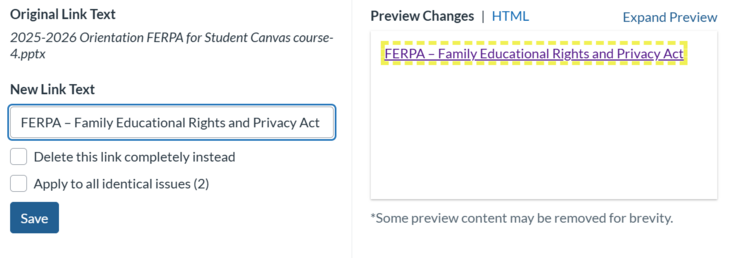
UDOIT will usually flag inaccessible links with a "Link Has Nondescript Text" error. Select it and use the Preview Changes screen to review the link: you can select it to navigate to the linked resource, or switch to HTML view to see the full URL (helpful when the link text is vague, such as “click here”). Update the link text in the left-hand panel. Be sure to "Save" your changes before moving on to the next issue.
-
Summary & Key Takeaways
Summary & Key Takeaways
- Screen readers can scan for links and create a list of links, so informative link text is helpful. Links in digital documents/pages should convey clear and accurate information about the destination.
- Do NOT link pages with text such as “Click here”.
- Best practice: XCITE’s Accessibility Guidance for Faculty
- Unhelpful practice: https://teaching.ucr.edu/accessibility-guidance-faculty
- Unhelpful practice: Click here
- Use unique link text for unique links. If you want to link out the same page more than once, use the same hyperlink text.
- If you are preparing a document or PDF that will be printed, then it is better to have the full hyperlink in printed versions of a document. You can use a service like Bitly or TinyURL to shorten lengthy website addresses for use in print materials.
- UDOIT can be used to quickly address Link issues within your Canvas Course